
Product Update
Web Renamer 2.0: Faster & Smarter
A major update bringing Saved Templates, a unified interactive UI, auto-save, and context-aware AI to your file organization workflow.
Oleksandr Erm
•Founder, Renamed.to
We've all been there: staring at a downloads folder full of scan_001.pdf, Invoice_FINAL_v2.pdf, and IMG_2025.pdf. It's digital clutter that slows you down, breaks your focus, and makes finding that one critical contract a nightmare.
File organization shouldn't be a manual chore. It should be instant, intelligent, and invisible. That's why we built the Web Renamer—to bring the power of AI file organization to your browser.
Today, we're releasing Web Renamer 2.0. We've rebuilt it from the ground up with a new interactive UI, smarter context-aware AI, and powerful template tools designed for heavy-duty workflows. Whether you're a freelancer organizing client assets or a finance team processing monthly expenses, this update is for you.
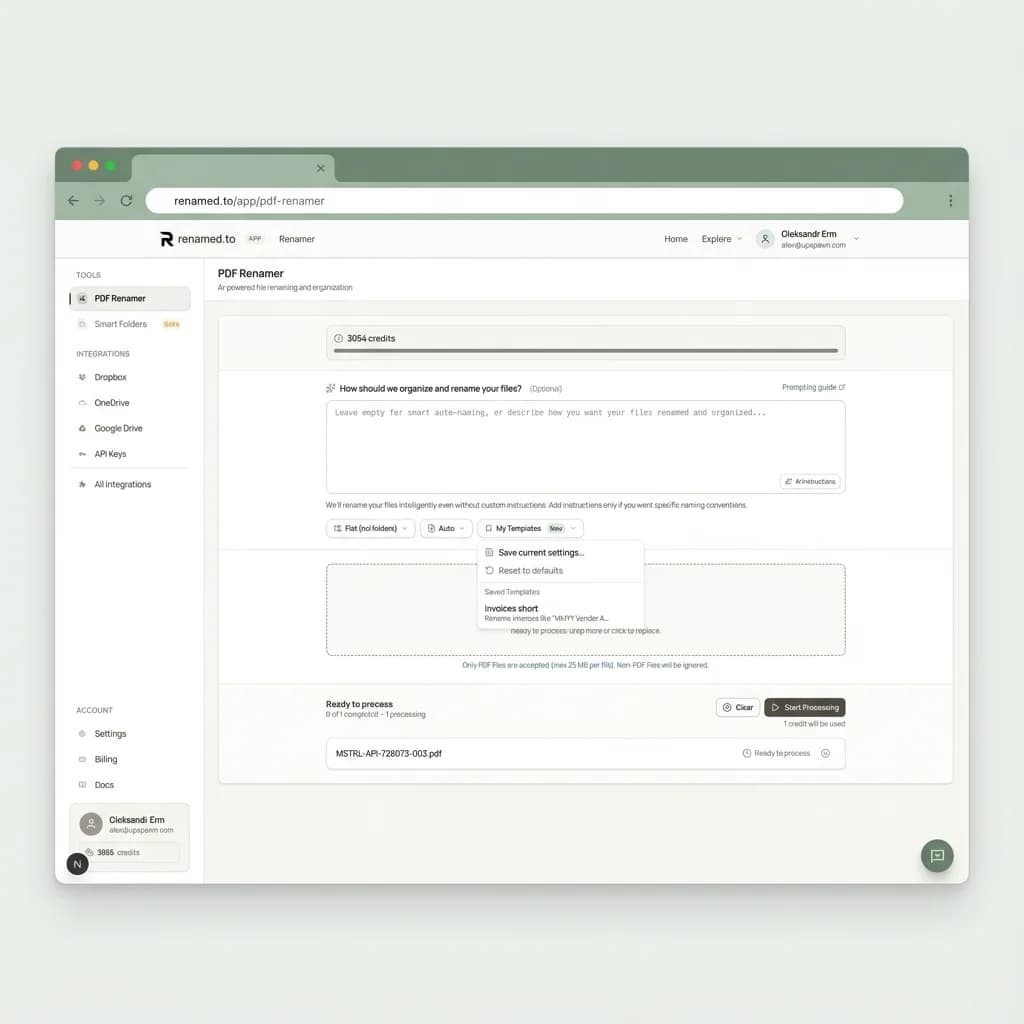
1. A New Interactive Command Center
The first thing you'll notice is the completely redesigned interface. We've introduced a Unified File List that gives you total visibility into your batch processing.
Drag and drop fifty files at once, and watch them transform in real-time. The new UI handles uploads, AI analysis, and renaming in parallel. You get immediate visual feedback—Sage green for success, Amber for processing—so you always know exactly where your files stand. No more guessing if a file is stuck or finished.
2. Saved Templates: "Set It and Forget It"
Consistency is the secret to a good filing system. But re-typing the same complex prompt every time you upload invoices is tedious.
With the new Saved Templates feature, you can capture your perfect workflow once and reuse it forever. Save your custom AI instructions, your preferred folder structure (e.g., Year/ClientName), and your filename pattern.
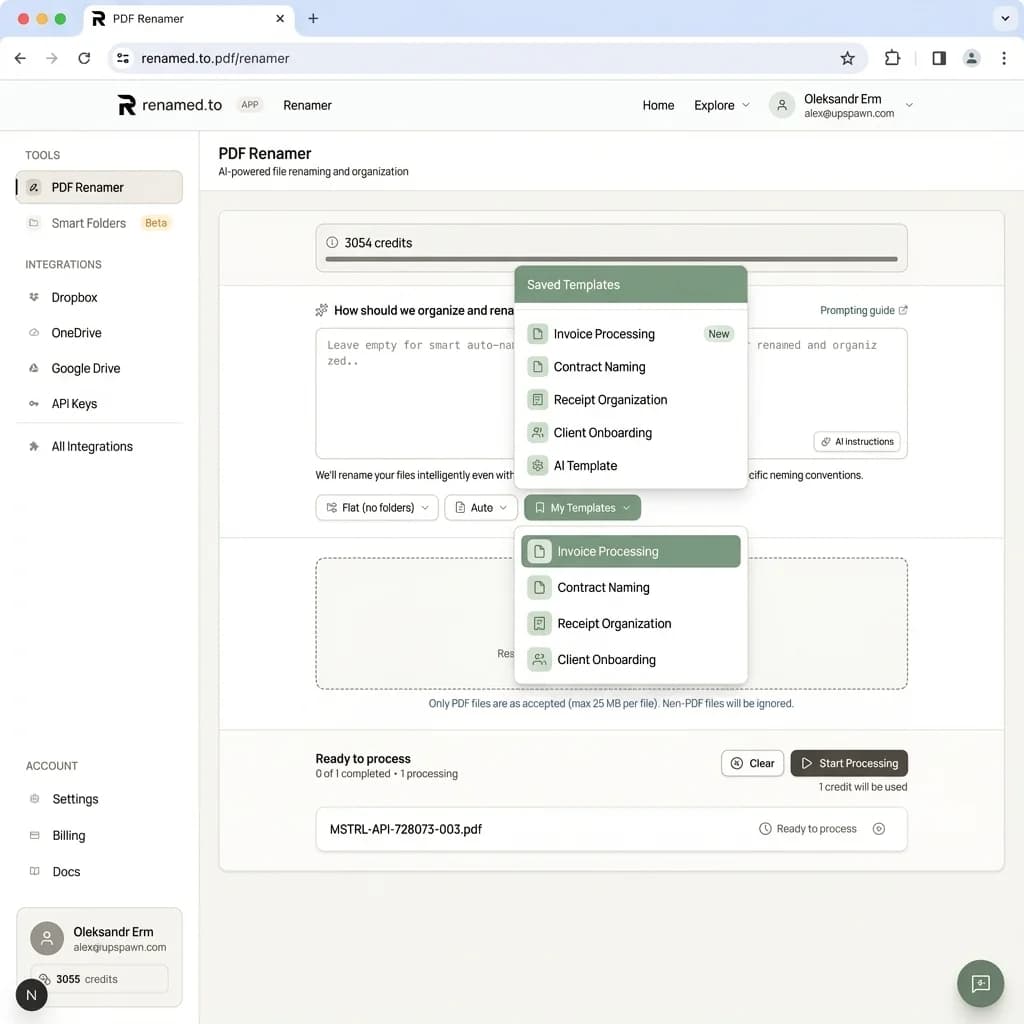
Next time you have a batch of "Monthly Expenses," just select your saved template from the dropdown. The AI instantly knows exactly how you want those files named and organized. It's automation without the setup time.
3. Smarter AI with "Batch Context"
This is the most significant under-the-hood upgrade. Most AI renamers treat every file as an island, which leads to annoying inconsistencies. One file might be named 2025-01-Invoice.pdf while the next becomes Invoice_2025-01.pdf.
Web Renamer 2.0 introduces Batch Context. The AI now has "short-term memory" for your current session. It looks at the recent paths and filenames it has just generated to ensure consistency across the entire batch.
If the AI decides to use the format Client_Date_Type for the first file, it will actively try to stick to that pattern for the rest. It's like having a dedicated assistant who learns your preferences in real-time, ensuring your folder structure looks clean and professional.
4. Auto-Save & Persistence
We've added a robust auto-save layer to the application. Your workspace state—including your custom prompt, selected strategy, and template choice—is automatically persisted locally.
Accidentally closed the tab? Browser crashed? Need to come back to this task tomorrow? No problem. When you return, everything is exactly where you left it. You can pick up your workflow instantly without re-configuring a single setting.
5. Blazing Fast Performance
We've moved to a new worker-based architecture that handles heavy lifting in the background. Uploads and AI processing now happen in parallel, meaning the system doesn't wait for file #50 to upload before it starts renaming file #1.
For large batches, this dramatically reduces total processing time. You can process hundreds of documents in minutes, downloading them as a neatly organized ZIP file ready for your archive.
Try the New Web Renamer
The new Web Renamer is live today for all users. It's the fastest, smartest way to turn document chaos into order.
Key takeaways
- Save recurring workflows with Saved Templates for one-click organization.
- Experience real-time control with the new Unified File List interface.
- Achieve perfect consistency with AI that learns from recent filenames and paths.
Oleksandr Erm
Founder, Renamed.to
Writing about file management, productivity, and automation at Renamed.to.
Further reading
Beyond PDF: How We Built the Fastest Office-to-Image Converter for AI Document Processing
Renamed.to now supports Word, Excel, and PowerPoint documents. Learn how our custom office-to-image converter renders documents to images in under a second for AI-powered naming.
Now in 9 Languages: Use Renamed.to Your Way
Renamed.to now speaks your language. Available in English, German, French, Spanish, Portuguese, Italian, Japanese, Korean, and Polish—so you can organize files without the language barrier.
Google Drive Automation: Compared
Compare 4 ways to automate Google Drive file management. Apps Script, Zapier, Make, and AI renaming tested side-by-side with cost, setup time, and limitations.
Renamed.to
Ready to organize your files?
Try the new Web Renamer today and get 50 free credits to start.
Open Web Renamer