
Dropbox for teams
Dropbox Naming Conventions for Teams
A practical Dropbox naming conventions playbook for teams: patterns that sort correctly, safe characters that sync everywhere, and how to enforce naming automatically at upload time.
Oleksandr Erm
•Founder, Renamed.to
“Dropbox naming conventions” sounds boring — until you have a shared folder with 15 people uploading files named scan.pdf and final_FINAL_v3.pdf, and your accountant/legal/ops team can't find the right document fast enough.
This guide is for teams using Dropbox (or Dropbox Business) who want a naming system that scales: simple rules, safe characters, predictable sorting, and a realistic enforcement plan.
Why Dropbox naming conventions break in teams
Most teams write a naming rule once, paste it into a Notion page, and call it done. The problem is human behavior: people are busy, they upload from mobile, and they don't have context for which fields matter to the next person.
“We have a naming convention… it’s just that nobody follows it.”
A Dropbox naming convention that survives needs three things:
- A pattern people can remember (3–5 fields, fixed order)
- Constraints (safe characters, collision strategy)
- Enforcement at ingestion (automation, not policy)
Step 1: Define your “naming contract” (the few fields that matter)
The fastest way to pick fields is to ask: How do we search for these files? Most teams filter by one of these axes:
- Date / period: statements, invoices, month-end close
- Entity: vendor, client, counterparty, job/site
- Document type: invoice, receipt, contract, permit, report
- Identifier: invoice #, PO #, contract type, claim #, project code
If you want ready-made patterns by team (accounting, legal, ops), start here: file naming conventions hub.
Step 2: Use safe characters (so names work on every device)
Dropbox syncs across different operating systems and filesystems. Your naming convention should avoid characters that cause Windows issues, sync problems, or hard-to-copy names.
YYYY-MM-DD dates, underscores for separation, and avoid special characters. Keep words short and consistent. If you need a version, use v01, v02, etc.Step 3: Decide what goes first (sorting beats aesthetics)
Filenames are not prose. They're an indexing system. Put the field you sort by first.
Common templates that work well in Dropbox:
2025-11_Chase-Bank_Statement.pdf
2025-10-12_Orion-Labs_NDA_Signed.pdf
JOB-18422_123-Main-St_Permit_2025-09-07.pdf
If your team struggles to agree on a pattern, use the generator to get a starting point you can tweak:
File naming convention generator.
Step 4: Enforce the convention (policy doesn’t scale)
You can try to “train” a team to rename files before uploading. It won't stick. Enforce the naming contract at the entry point.
There are three practical enforcement modes:
- Manual enforcement: works for small teams; breaks with volume.
- Dropbox-native naming conventions: adds consistent prefixes/suffixes, but still depends on dropping files into the correct folder first.
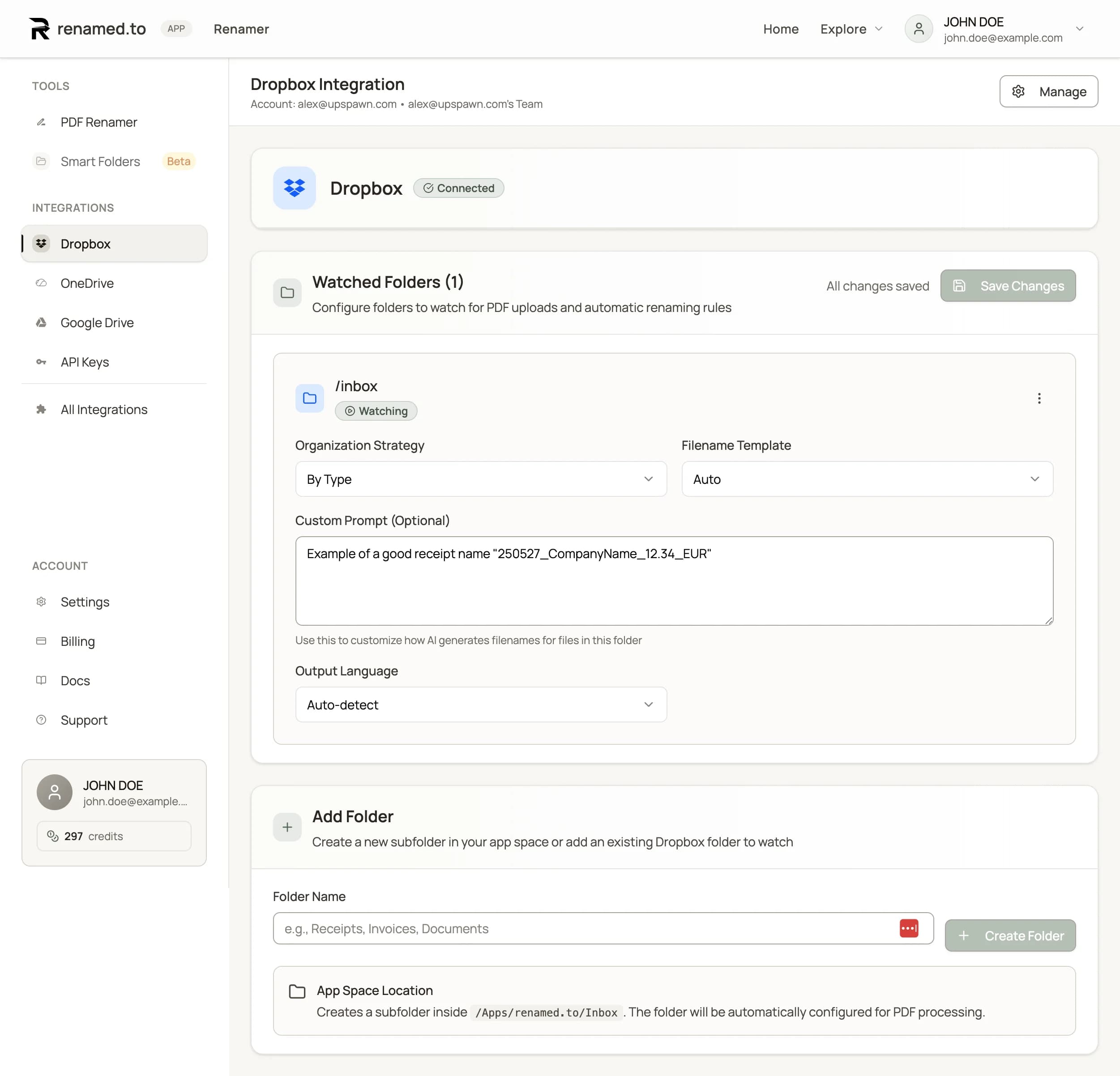
- Watch-folder automation: reads the document content, generates a compliant filename, and routes the file to the correct destination automatically.
If you want the watch-folder approach in Dropbox, start with our integration page:
Dropbox integration — renamed.to.
Step 5: Make it a team system (shared rules + auditability)
“Dropbox for teams” adds the governance problem: you don't just need consistent names, you need a consistent process. The naming convention should live as:
- One shared template (not per-person rules)
- A clear exception path (what happens when confidence is low?)
- An audit trail (who renamed what, and when)
We cover the end-to-end Dropbox automation stack (native → Zapier/Make → watch-folder agents) in the main guide here:
How to Automate File Organization in Dropbox (Without Coding).
Key takeaways
- A naming convention is a contract: few fields, fixed order, easy to remember.
- Put the sorting field first (usually date or entity).
- Use safe characters so names work across Windows/macOS sync.
- The hard part is enforcement—automation beats policy.
- Teams need shared rules and an exception path, not “everyone renames their own way.”
Oleksandr Erm
Founder, Renamed.to
Writing about file management, productivity, and automation at Renamed.to.
Further reading
Beyond PDF: How We Built the Fastest Office-to-Image Converter for AI Document Processing
Renamed.to now supports Word, Excel, and PowerPoint documents. Learn how our custom office-to-image converter renders documents to images in under a second for AI-powered naming.
Now in 9 Languages: Use Renamed.to Your Way
Renamed.to now speaks your language. Available in English, German, French, Spanish, Portuguese, Italian, Japanese, Korean, and Polish—so you can organize files without the language barrier.
Google Drive Automation: Compared
Compare 4 ways to automate Google Drive file management. Apps Script, Zapier, Make, and AI renaming tested side-by-side with cost, setup time, and limitations.
Renamed.to
Enforce your naming convention automatically
Stop relying on team discipline. Use a watch folder to rename and route PDFs in Dropbox based on content.
Connect Dropbox